MicControl
A downloadable tool for Windows
Uses any keyboard key as push to talk by directly controlling the microphone's mute/unmute in windows. This means it will work with any program or games such as Skype, Discord, etc.
100% free - donation is optional
Installation: Just unzip and run!
Some programs/games may require you to launch this tool as admin. This will also allow you to use the "start with Windows" feature which will start it as admin.
Features:
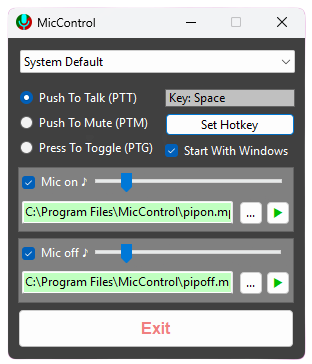
- Can select any connected mic.
- Chose between Push to Talk, Push to Mute or Press to Toggle
- Set any keyboard key as the Push To Talk hotkey.
- Close to hide it in the in the system tray.
- System tray icon turns red when mic is muted and green when unmuted.
- Option to Start with Windows (starts minimised in the system tray).
- Optional sounds for mute/unmute. Can use default included MP3 or custom MP3 with volume control.
Download
Click download now to get access to the following files:
Leave a comment
Log in with itch.io to leave a comment.